EA What is it? Get to know gold-trading EAs on MT5 before you start
EA is a program that opens and closes orders automatically according to written rules. This article covers everything from how an EA works, what types there are and what to prepare, to how to tell which EAs are worth using and which to avoid.
EA What is it
EA stands for Expert Advisor is a program attached to a chart in the MetaTrader trading platform (MT4 or MT5) that opens, closes or adjusts orders by itself according to rules set by its author, for example: "If the price falls to this point, open a Buy" or "If total profit reaches the target, close everything"
In Thai it is often called trading bot or automated trading program which mean the same thing. When we say EA gold trading we mean an EA that trades gold, which brokers list under the symbol XAUUSD (gold against the US dollar).
EA cannot "see the future" It simply follows the same rules over and over, consistently, without getting tired, scared or greedy. So the result depends on how good those rules are and what kind of market they can handle.
EA How it works
- Runs inside MT5: EA It is an .ex5 file that you drag onto a chart, then turn the Algo Trading button green.
- Reads the price on every move: EA It checks its conditions every time a new price arrives.
- Sends orders to the broker: When the conditions are met, the EA immediately sends an order to open or close in your account.
- MT5 must stay open: If your computer is turned off or the internet drops, the EA stops. That is why most people use a VPS (a rented computer that stays on 24 hours).
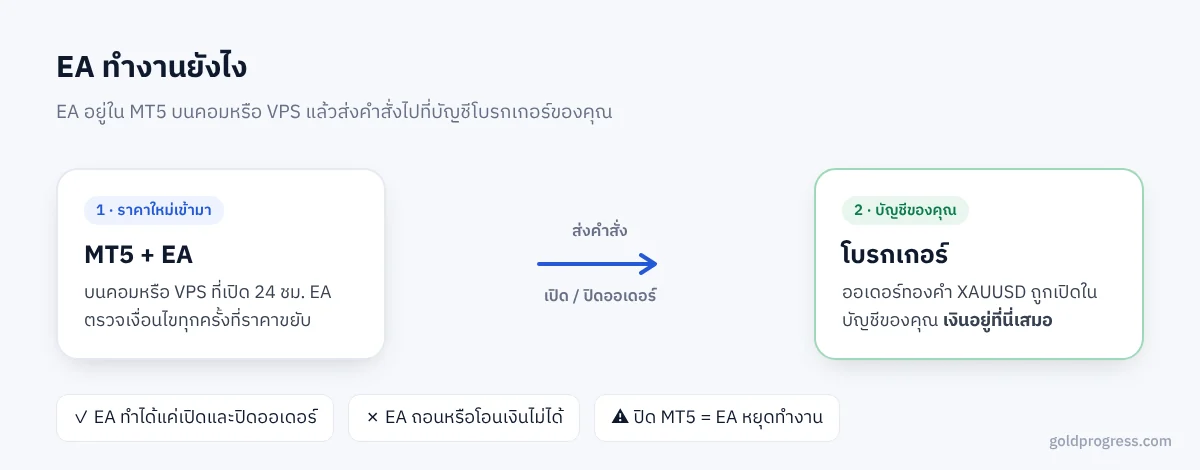
The key point is Your money always stays in your broker account. EA It can only open and close orders. It cannot withdraw or transfer money out of the account.
EA What types are there
| Type | Principle | Strengths | Watch out for |
|---|---|---|---|
| Trend following | Enters in the direction the market is moving | Big profits when the trend is long | Loses often when the market moves sideways; the profit curve goes up and down in phases |
| Scalping | Quick in and out, taking short profits | Holds orders only briefly | Very sensitive to spread and broker speed |
| Grid | Opens additional orders in layers when the price moves against it, then closes the whole basket when total profit reaches the target | Wins often, steady profit in a swinging market | Floating loss grows fast when the price runs one way for a long time |
| Martingale | Increases the lot exponentially after a loss | Looks like it almost never loses | Very high risk; a single mistake can wipe out the account |
EA Most gold-trading EAs in the Thai market are the Grid type, or a mix of Grid and Martingale. If you plan to use this kind of EA, read Grid EA What is it and the risks you need to know first
Pros and cons of EA
Pros
- Works the whole time the market is open, so you do not have to watch charts
- Follows the rules every time, with no emotion and no raising the lot out of a wish to win it back
- Past results and live results can be checked with clear numbers
Cons
- EA Every EA has market conditions in which it loses. No EA profits in every situation.
- Strong news or sudden price jumps can cause bigger losses than expected.
- You need to handle technical matters: VPS, connection, updates. MT5
- A backtest that looks very good may come from tuning the settings too closely to the past.
What to prepare before using EA
- A broker account that you use with MT5 and that offers gold. The symbol name may differ, such as XAUUSD, XAUUSDm or XAUUSDc
- Choose an account type If your capital is small, a Cent account lets you use small lots. Read more at What is a Cent account
- VPS or a computer that can stay on all the time so the EA does not stop midway
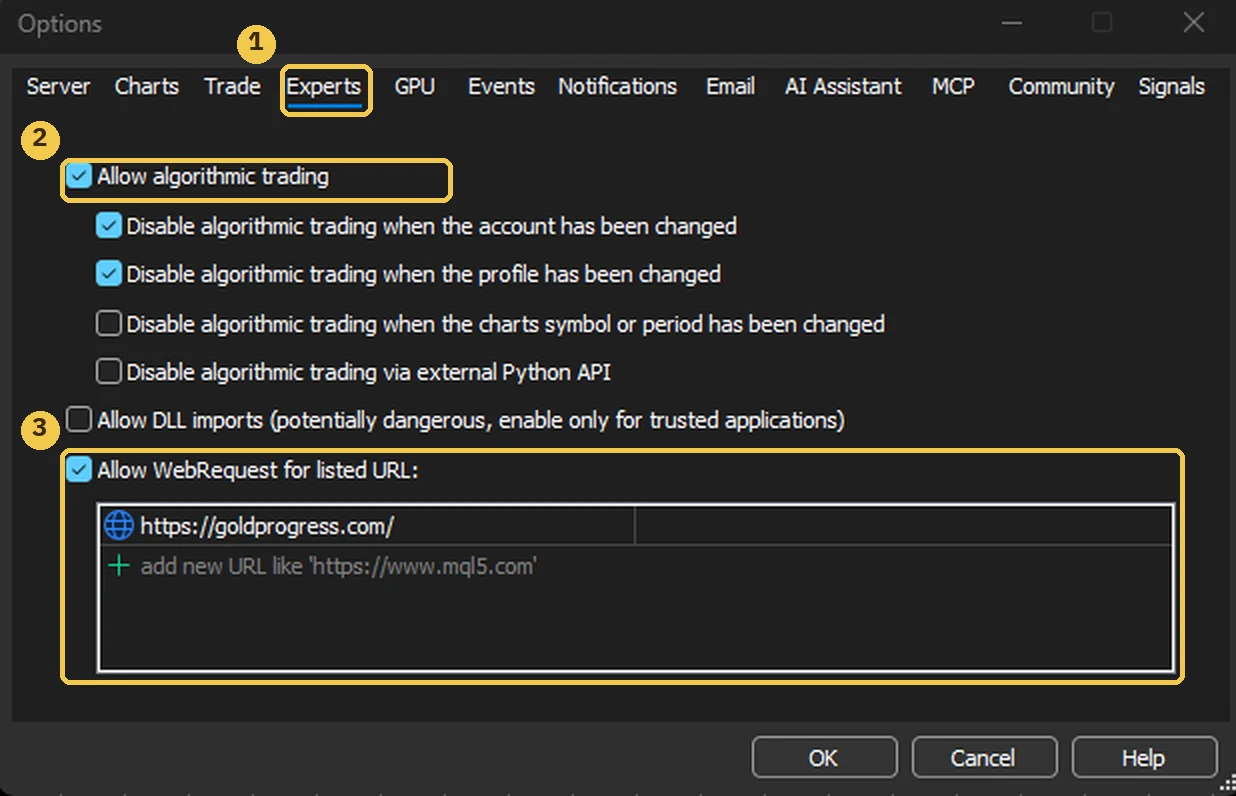
- Settings MT5: Turn on Algo Trading, and if the EA verifies its license over the web, you must add the website in Tools → Options → Expert Advisors → Allow WebRequest
- Capital you can afford to lose: Use only money that, if lost entirely, would not affect your life.
How to choose a safe EA: 7 things to check
- Verifiable real trading results for example an account verified on Myfxbook, not just a screenshot
- Look at maximum drawdown, not only profit A profit of 10% a month but a past drawdown of 60% is very high risk.
- A long enough history At least 6 months, and having been through volatile markets.
- The seller says plainly what type of EA it is Grid or Martingale, and explains the risks
- Has protection such as limiting the number of orders, limiting the lot, or stopping when floating loss reaches a threshold
- Can be tried first on a demo or with a free trial period
- Does not ask for your withdrawal password and does not have you transfer money to a personal account and does not promise fixed profits
"Guaranteed 30% profit a month", "Never loses", "Deposit money with us and wait for dividends" If you see wording like this, be careful. A good EA states its risks clearly, and the money must stay in your own account.
EA by Gold Progress: how it differs from typical EAs
Gold Progress There are 3 gold-trading EAs on MT5: QQ Buy, QQ Sell and Grid Hunter. They work together with a system that makes risk easier to control.:
- AI First-order check: Before an EA opens the first order of each round, the AI checks market conditions. If the timing is poor, it tells the EA to wait and explains why in English.
- AI Team manager: If the market runs strongly one way, it automatically pauses the side that goes against the market.
- Gold Office: See each EA as an employee in the office, watch profit and loss live, and pause or close orders from your phone.
- Floating-loss protection: Default 30%. When the threshold is reached, the EA stops placing more recovery orders.
These systems help reduce risk, butthey do not make the risk go away. Start with one account, watch the real results for 2–3 months, then decide whether to expand.
Try the EAs on your real account
Open Gold Office free for 14 days with full access including AI, and watch the team work live from your phone.
Start the free 14-day trial No card required · no automatic charge after 14 days · your money stays in your broker accountRead more
 Trading account
What is a Cent account? How it suits gold EAs with small capital
Deposit 1 dollar and get 100 USC. Why it suits small capital and Grid EAs, how to think about lots, and what to watch for
 Risk
Grid EA What is it? How it works and the risks you need to know
Why Grid wins often but is risky: see floating-loss figures when the price runs far, and how to control the risk
This article is general information, not investment advice. Trading gold is high-risk and you may lose the entire balance of your account. ReadRisk Warningbefore you start