Let EAs look after your gold trading while you get on with your life.

The system consists of three EAs that trade gold (XAUUSD) on MetaTrader 5 in your account whenever the market is open. An AI checks timing before each new cycle starts, and Basket Guard looks after open orders. You can follow everything on the website and pause or close orders yourself.

No card required. Every feature, including AI, is available during the trial, and your funds stay in your broker account at all times.

A man at a street-side café in Bangkok checking his phone
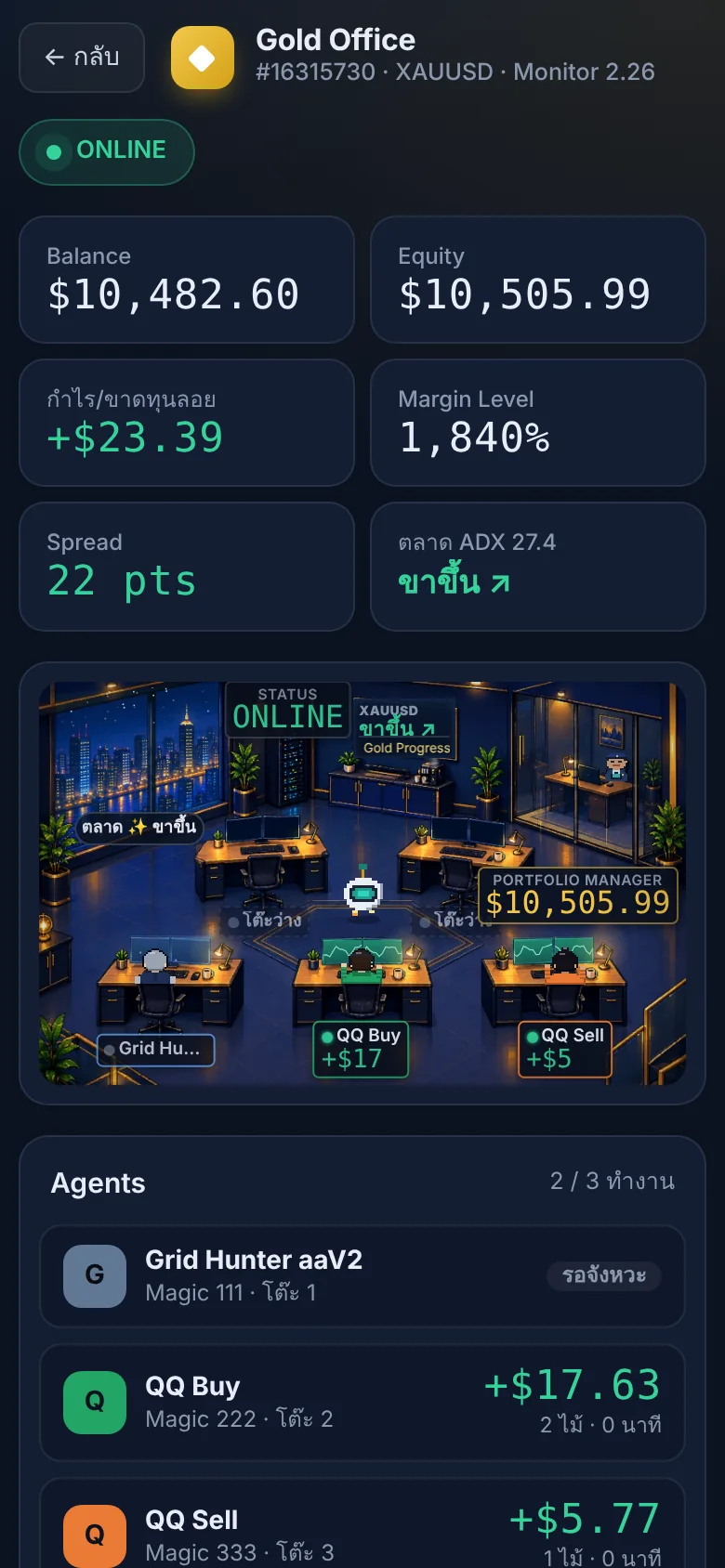
Gold Office on a phone, showing Balance, Equity and each EA desk
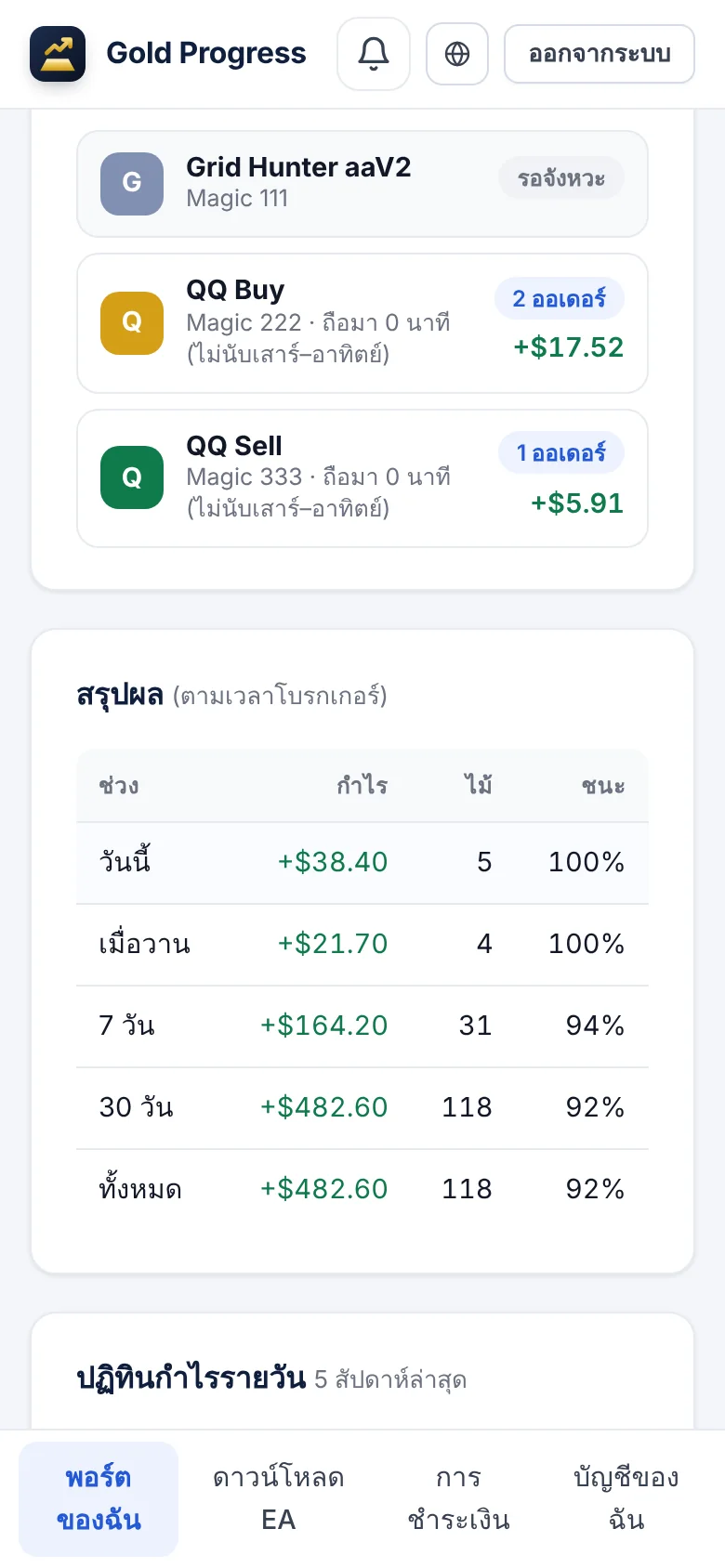
The account page on a phone, showing each EA, its P/L and the daily summary

real-time monitoring

Gold Office is an office-style dashboard for monitoring your account. Each desk represents one EA in your MT5 account. Open it on your phone to see right away which EA is holding orders and how much profit or loss it has.

  • QQ Buy and QQ Sell trade the buy and sell sides separately
  • Grid Hunter enters trades in line with price momentum, and works together with the others in a single account
  • Comes with a settings file tested by our team, so no tuning is needed.

A woman sitting on a sofa at home in the evening, looking at her phone

Manage it from home

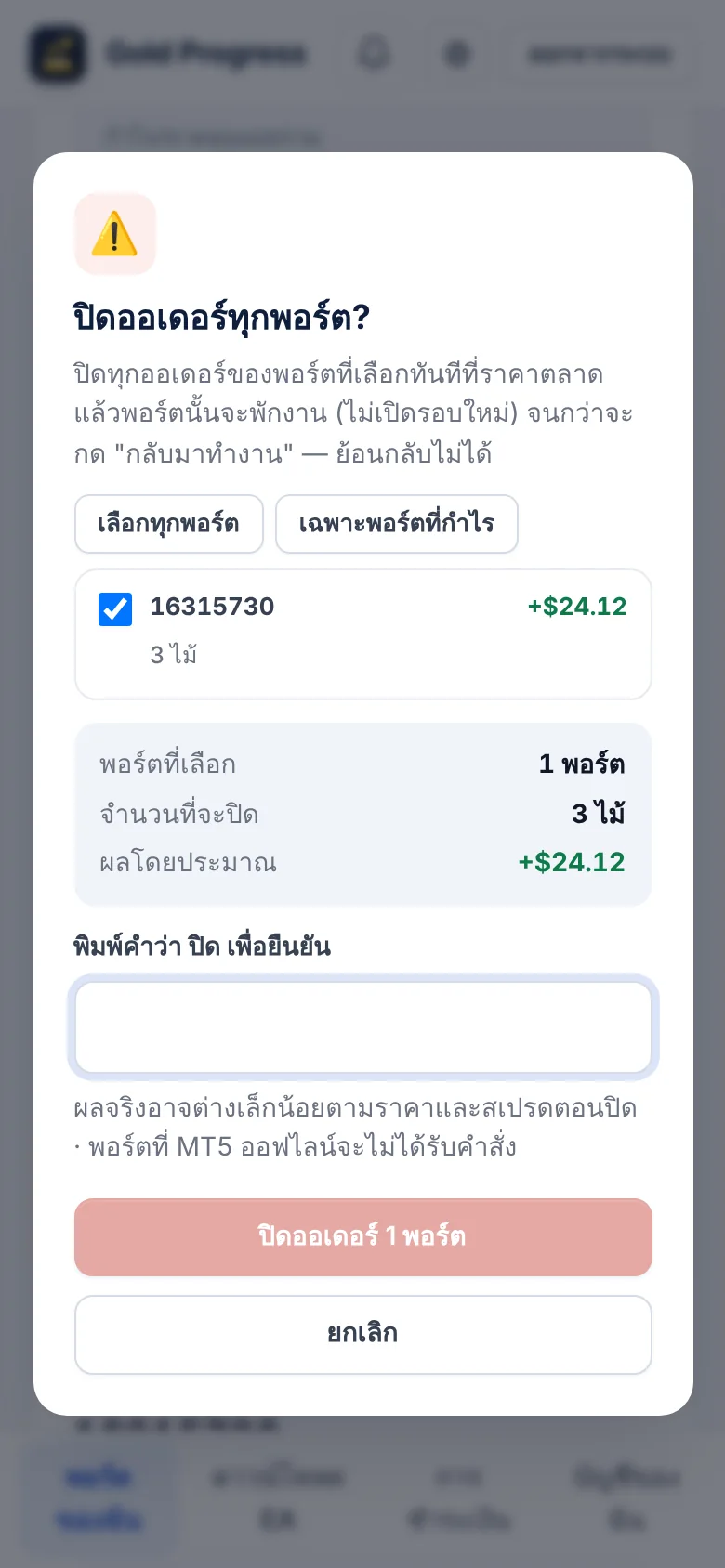
Pause an EA, close orders one at a time or across every account at once, and set orders to close when a target is reached, all without opening MT5

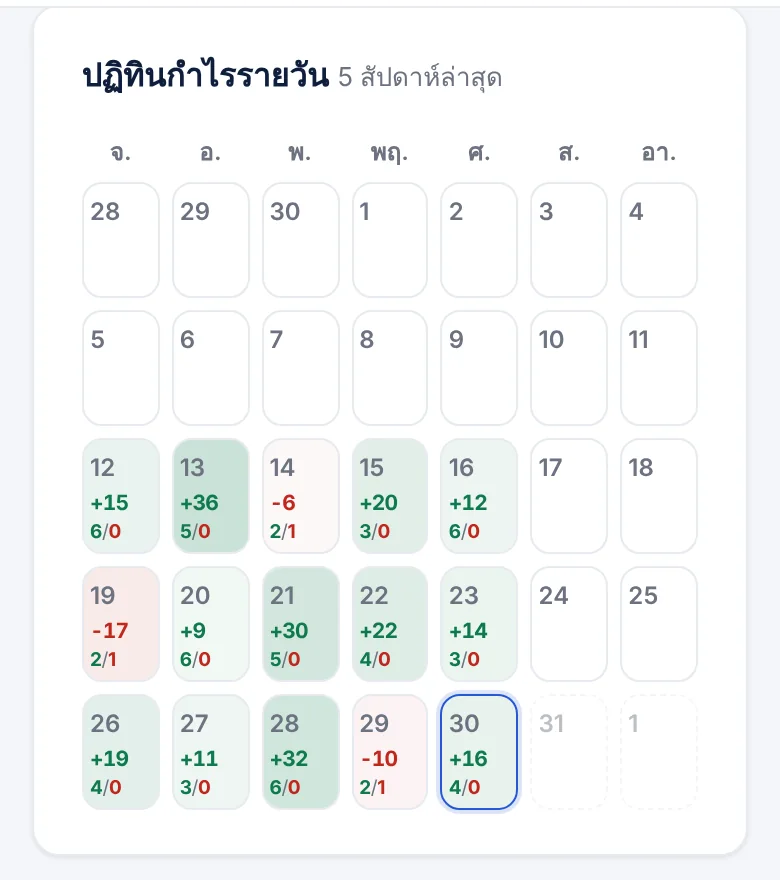
Track results every day

A daily profit calendar showing both profitable and losing days

The daily P/L calendar on the account page, with both profitable and losing days
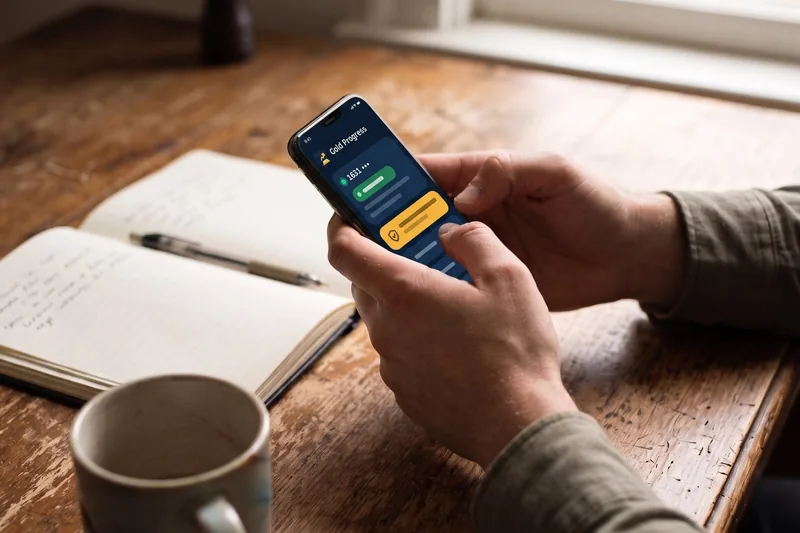
Hands holding a phone showing the Gold Progress app on a wooden table, beside a notebook and a coffee cup
Gold ProgressAccount 1631••••
EA running normally
Only the account owner can withdraw

Your funds stay in your account

Your funds stay in your broker account at all times. An EA can only open and close orders and cannot withdraw money. A license is tied to the account number and can be used on one machine only.

Basket Guard

Looks after open orders whenever the market is open

  • When the market moves sharply against youTemporarily stops opening recovery orders
  • When there is enough profitCloses the most heavily losing order to reduce risk
  • During major newsTemporarily holds off starting new cycles, then resumes by itself after the news

AI that explains its reasoning every time it makes a decision

Every time the AI tells a side to wait or pause, you can read the reason right away on the website, and the AI keeps learning from your account's real trading results.

  • If the timing isn't right, the AI will ask to wait and then re-evaluate automatically.
  • Choose whether the AI executes actions or only offers its opinion
  • Included in the Pro AI and VIP packages at no extra cost
Try AI free for 14 days
Decision logExample
  1. QQ Sell asks to start a new roundWait

    Price has been falling steadily and is near a key support level. Opening a Sell now risks a rebound, so it is better to wait for price to bounce up before entering.

    Automatically re-evaluates in 15 minutes
  2. QQ Sell asks to be re-evaluatedGo ahead

    Price bounced up to test resistance and then weakened. The main trend is still down, so a Sell can be opened.

  3. Basket Guard · QQ BuyRecovery orders paused

    QQ Buy has 3 orders, and with the market in a strong downtrend on both H1 and H4, opening recovery orders is paused for now. It will resume when selling pressure eases.

Get started in 4 steps

  1. Sign up

    Sign up with a Google account or a username and password. It takes less than a minute.

  2. Add an account number MT5

    Enter your account number and broker name. One account counts as one branch.

  3. We activate your trial

    Then download the EA and settings file from the website.

  4. Install and start

    Follow the step-by-step guide to install, or choose the VIP package and let our team install it for you.

Start with one branch

This system is not a shortcut to wealth. Let your first branch prove its results before you expand.

  1. First month

    Try it free for 14 days on one account, using the recommended settings.

  2. 2–3 Month

    Follow results through both profitable and losing periods, so you understand how the system behaves before you decide.

  3. When you're ready

    Open a new branch with capital you have ready, rather than increasing lot size in an existing account. The 2nd branch onward gets a discount. 20%

Every branch uses the same EAs on gold, so they may lose during the same period. Please expand only with money you can afford to risk.

The close-all dialog: pick accounts and type to confirm before the command is sent

Choose the package that suits you

Price per account, all services included. Try every feature free for 14 days. The 2nd account onward gets a discount. 20%

Launch price · join now and keep the launch price when you renew

What you get

Starter

For those who have a VPS and can configure things themselves

THB 990 THB 690 / Month

or THB 9,900 THB 6,900 / year (Saves the equivalent of 2 free months)

Recommended

Pro AI

AI helps reduce entries at the wrong time

THB 1,290 THB 990 / Month

or THB 12,900 THB 9,900 / year (Saves the equivalent of 2 free months)

VIP

Our team handles installation and care for you

THB 1,990 THB 1,490 / Month

or THB 19,900 THB 14,900 / year (Saves the equivalent of 2 free months)

Receive every EA, with ready-made settings files
Gold Office Real-time monitoring
Pause / close orders from your phone
Web notifications
AI first-order filter, with the reason given every time—
Basket Guard looks after orders when the market is volatile—
Our team installs and looks after your EA on a VPS 24 hours a day——
Start free trial Start free trial Start free trial

Starter

For those who have a VPS and can configure things themselves

THB 990 THB 690 / Month

or THB 9,900 THB 6,900 / year (Saves the equivalent of 2 free months)

  • Receive every EA, with ready-made settings files
  • Gold Office Real-time monitoring
  • Pause / close orders from your phone
  • Web notifications
Start free trial
Recommended

Pro AI

AI helps reduce entries at the wrong time

THB 1,290 THB 990 / Month

or THB 12,900 THB 9,900 / year (Saves the equivalent of 2 free months)

  • Receive every EA, with ready-made settings files
  • Gold Office Real-time monitoring
  • Pause / close orders from your phone
  • Web notifications
  • AI first-order filter, with the reason given every time
  • Basket Guard looks after orders when the market is volatile
Start free trial

VIP

Our team handles installation and care for you

THB 1,990 THB 1,490 / Month

or THB 19,900 THB 14,900 / year (Saves the equivalent of 2 free months)

  • Receive every EA, with ready-made settings files
  • Gold Office Real-time monitoring
  • Pause / close orders from your phone
  • Web notifications
  • AI first-order filter, with the reason given every time
  • Basket Guard looks after orders when the market is volatile
  • Our team installs and looks after your EA on a VPS 24 hours a day
Start free trial

Our team does not make trading decisions for you. Trading involves risk, and past performance does not guarantee future results.

Two support staff, one with a headset, looking at a laptop together

Questions? Contact our team.

Our team can help set up your broker, install the EA, and answer questions about using the system via LINE. For VIP customers, we install and look after the EA on a VPS 24 hours a day.

Contact our team via LINE

FAQ

Gold Office What is it

Gold Office is a web dashboard on Gold Progress for monitoring your gold trading account, laid out as an office. Each desk represents one EA trading in your MT5 account, with an AI acting as manager to watch market timing. Open it on your phone in real time to see which EA holds orders and how much profit or loss it has, and pause an EA or close orders instantly, while your capital always stays in your own broker account.

Which brokers can I use?

Works with any broker that supports MetaTrader 5 and offers gold (XAUUSD). Symbol names may vary by broker, and our team is happy to help with the setup.

Where are my funds?

Your funds always stay in your trading account with your broker. Gold Progress has no authority to withdraw or transfer money. An EA can only open and close orders in the account where you install it.

Do I need to leave my computer on all the time?

EA needs to run on MT5 whenever the market is open, so we recommend a VPS for stability. If that is inconvenient, the VIP package includes installation and 24-hour care of your EA on our VPS, and you can still follow results from your phone anywhere.

AI — what does it do, and is there an extra cost?

AI checks timing before the EA opens the first order of each cycle, and helps pause trading on the side that runs strongly against the market, explaining its reasoning every time. This feature is included in the Pro AI and VIP packages at no extra cost, and is available during the 14-day trial.

Does the VIP package require my MT5 password?

A password is required to install the EA on a VPS, and it is entered only through the web form. The system encrypts the data before storing it. Our team will never ask for your password via LINE or phone, and we recommend using a trading password rather than a withdrawal password.

Will I be charged automatically after the 14-day trial?

There are no automatic charges. When the 14 days end, the EA stops running until you renew manually.

Can I open multiple branches (multiple accounts)?

Yes. The trial covers 1 account. After you subscribe to a package, you can add an unlimited number of accounts. Each account has its own package and expiry date, and the 2nd account onward gets a 20% discount. We recommend that your first branch has at least 2–3 months of trading results before you open a new one, and that you use only money you can afford to risk, since every account uses the same EAs and may lose during the same period.

How do I renew or change my package?

Log in → My Accounts → "Renew / Change package" Choose a package and duration, transfer payment, and attach the slip. Our team will verify it and add days to your license. Remaining days carry over and are never lost (if you change packages mid-cycle, the system automatically converts the remaining days by value).

Learn more in the guide EA What is it, What is a Cent account and Grid EA and its risks

Start your first branch

Free 14-day trial, no card required, and no automatic charge when it ends

Risk Warning: Trading gold and CFDs carries high risk and you may lose your entire investment. Past trading results do not guarantee future results. The EA is a trading tool, not investment advice. Please invest only money whose risk you can accept